
Set custom anonymization & retention rules
You can set custom data retention rules to automate anonymizing or deleting data after a set retention period. This helps you to easily comply with data privacy obligations and reduces the manual effort on your side.
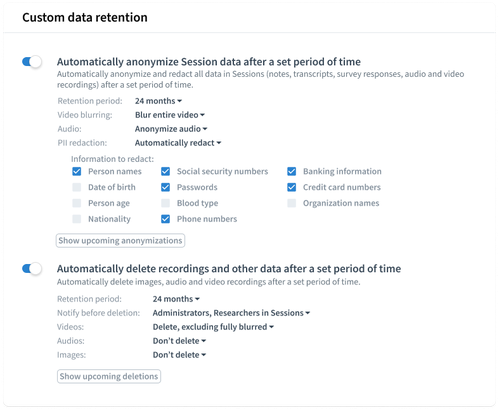
Admins can set these rules under  Settings > Workspace > Data Security & PII, in the Custom data retention section. Each rule has its own retention period, so you can use one or both, for example anonymize after 6 months and delete after 12.
#1 Automatically anonymize Session data after a set period of time
Set a retention period, in months or years, then choose how Session data is anonymized once it's reached:
Video blurring: Don't anonymize, Blur faces, Blur names, Blur faces and names, or Blur entire video
Audio: Don't anonymize or Anonymize audio
PII redaction: Don't redact, Suggest, or Auto-apply, with the information to redact from transcripts, notes, and other text-based content: Person names, Date of birth, Person age, Nationality, Locations, Social security numbers, Passwords, Blood type, Phone numbers, Email addresses, Banking information, Credit card numbers, Organization names, and Job titles.
Anonymized data stays in Condens and remains usable.
Use in your Settings to see what's scheduled before it happens.

Read more about anonymization & PII redaction features in this article.
#2 Automatically delete recordings after a set period of time
Set a retention period, in months or years, then choose which recordings get deleted once it's reached. Video and audio are set separately, and transcripts and other Session data stay.
Video: Delete video recordings, with the option to exclude fully blurred videos and face-blurred videos
Audio: Delete audio recordings, with the option to exclude voice-anonymized audio
None of the exclusions are switched on by default. To keep recordings you've already anonymized, switch on the matching exclusion.
Under Notify before deletion, choose who gets a heads-up before a deletion happens: Administrators, Researchers in Sessions, or both.
Likewise, you can use the button to review your settings and see what's scheduled for deletion before it happens.
How it works:
The automatic deletion applies to the video and audio recordings you select, uploaded to Sessions, which is where raw data is stored in Condens. Transcripts and highlights created from these recordings will not be deleted, so you keep all the evidence in text form. Video highlights from a deleted recording become text highlights, so the quote stays in your Artifacts.
If you use both rules, you can keep recordings you've already anonymized by excluding them from deletion. Recordings without a matching exclusion are deleted when the retention period ends.
Your custom retention periods (e.g. 1 year) are calculated from the Session date, not the upload date.
Retention rules apply to Sessions. They don't apply to Artifacts or participant profiles.
You remain in full control over your data and can adjust these settings yourself at any moment.
Previously set up by our team?
Custom data retention used to be something we configured for you, with a monthly email report of files scheduled for deletion.
You can now set your rules directly in Data Security & PII settings, review what's scheduled at any time, and adjust them whenever your policy changes. We'll transfer your existing retention rules over automatically, so you'll find them set up in your Settings. One change: retention periods used to be calculated from the upload date and now follow the Session date. The monthly email is replaced by the upcoming anonymizations and deletions overview and the notifications above.
For any questions, feel free to reach out to us at hello@condens.io.