Explore the 2026 AI trends shaping UX research: MCPs, AI moderation & digital twins. Register for the webinar
For product and UX designers

Bring customer insights into
every design decision

Find past research in seconds, let AI take the first pass at usability tests and interviews, and access user insights right where you design. Easy to pick up, even if research is only part of your job.
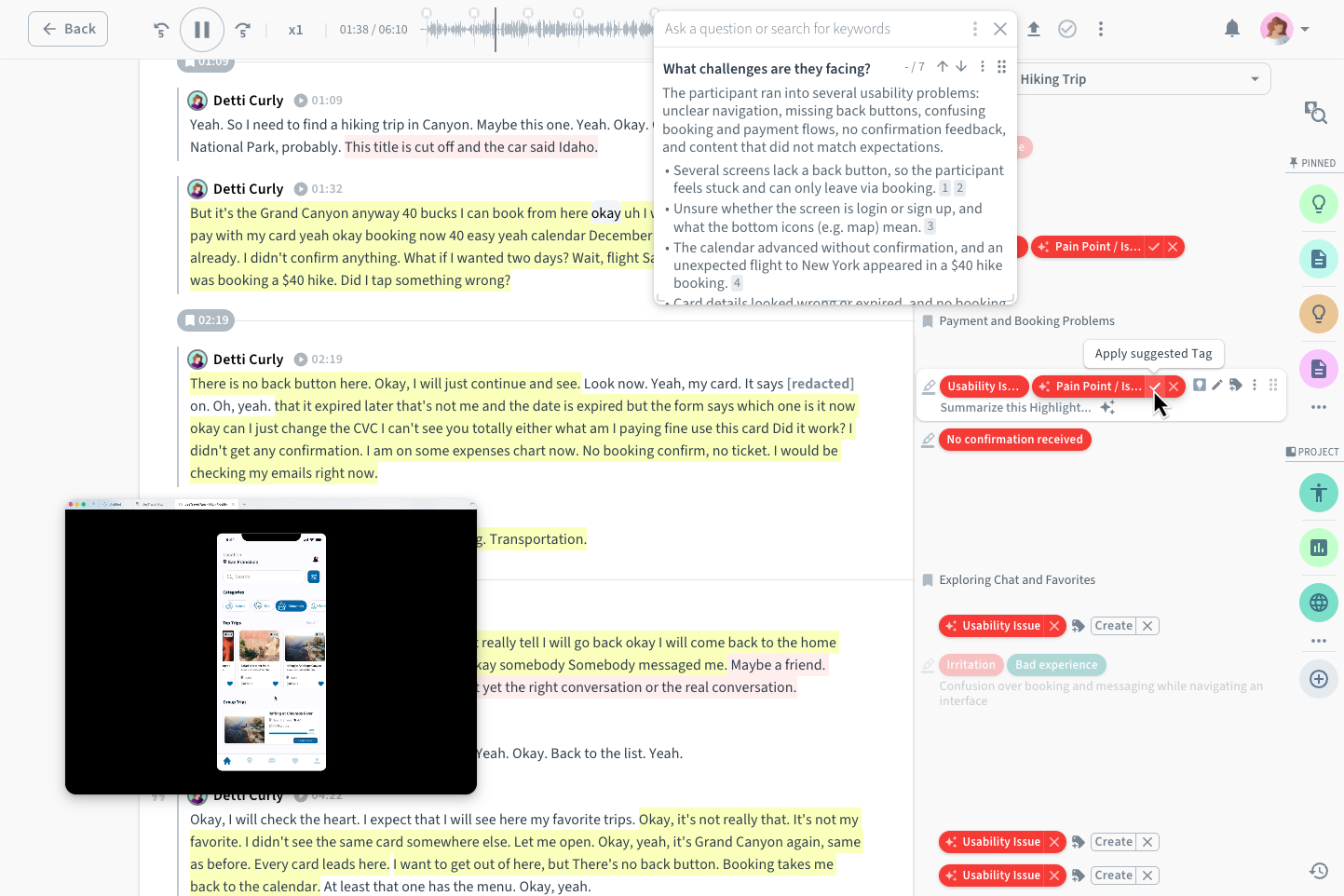
A usability test session in Condens with highlighted transcript, suggested tags, and an AI answer to the question what challenges participants faced

Design with user evidence

Ground design decisions in real user evidence, so you can move forward knowing you’re solving the right problems.

Spend more time designing

Get from research to clear direction faster, without analysis and documentation taking over your design process.

Get buy-in faster

Bring users into the conversation, so design discussions become easier to align on and decisions move forward faster.
British Airways Holidays
H&M
Siemens
Eventbrite
Just Eat Takeaway
Volkswagen
Accenture
Airbus
Whirlpool
Celonis

User research, made for the way
designers work

Design moves fast and research doesn’t always keep pace. Condens helps you get user insights into decisions sooner, whether you’re validating an idea, uncovering friction, or building on what your team already knows.

Start with what your team already knows

Before you redesign a flow, see what users have already said about it. Search across every study your team has run, or ask Condens AI and get answers linked to the original evidence, right in Condens, Slack, Teams, or your AI assistants.

Learn more

Let AI take the first pass on your analysis

Usability test, interview, or feedback call: capture insights as they happen with Live Notes, or import recordings from Zoom, UserTesting, and more. Condens AI transcribes and summarizes each session, bookmarks key topics, and suggests tags. You keep the final say.

Learn more

Turn observations into design input

Auto-cluster highlights on the whiteboard by theme or sentiment, guided by your own prompts. Turn patterns into findings and keep live Figma files and prototypes right next to them. Months later, anyone can see why a design looks the way it does.

Learn more
4.8 / 5
g2.com
(opens in new tab)

100+ verified reviews

Leader in User Research Software Tools

Read the full reviews on G2 (opens in new tab)
  • “Condens is built by people who really care about user experience. It's intuitive to use with a good depth of features.”

    Louise B.

    Head of Pro Experience, Mid-Market

  • “User-friendly research hub with reliable support, AI innovation and Slack integration.”

    Rachel K.

    UX Research Manager, Enterprise

  • “The AI analysis is really good too especially for open questions in unmoderated tests.”

    Andreas S.

    UX Lead & Senior Project Manager, Mid-Market

Bring customer knowledge into Figma Make

Connect Condens to Figma Make via MCP and design with your published research as context. Ask what users struggled with in a flow, explore variations based on those findings, and trace every suggestion back to its source.

Learn more

Let users make the case for your design

Don’t just tell stakeholders what users said. Show them. Turn highlights into video clips, no editing required. Anonymize and share them in Slack, Teams, or via a link. Sometimes 30 seconds of a user struggling with a flow says more than another slide ever could.

Learn more

Turn best guesses into user-backed designs

Try Condens with your next research project and see how quickly you can design with user evidence, without the research overhead.

Built for designers who
do research

Everything you need to get from recording to design decision faster. Easy to learn, without becoming a full-time researcher.

Multilingual transcription

Turn interviews and usability tests into searchable transcripts, ready to highlight, tag, and analyze.

AI summaries and highlights

Get a head start on analysis with summaries and suggested highlights from every session.

AI search

Ask questions across your research and get answers linked to the original evidence.

MCP server

Bring published customer research into Figma Make and the AI assistants and agents your team already uses.

AI-assisted clustering

Group related observations with AI and uncover patterns across sessions faster.

Highlight reels

Turn key moments into reels that make findings easy to understand and share, no editing needed.

Figma embeds

Keep live designs and prototypes next to the research and findings that shaped them.

FigJam and Miro

Bring research highlights into the whiteboards you already use to cluster, synthesize, and ideate.

Slack and MS Teams

Find and share customer knowledge without leaving the tools your team uses every day.

Real-time collaboration

Brainstorm, synthesize data, and collaborate on research notes, findings, and whiteboards.

Visual artifacts

Create engaging reports, personas, journey maps, and affinity maps in Condens.

Live notes

Capture real-time observations during user interviews, usability tests, and research sessions with live notes.

Condens fits right in with your design tools

Connect the tools you test, design, and share in. From Zoom to Figma, your research goes where your design work happens.

How leading design teams work with Condens

See how product and design teams use UX research to shape designs, avoid repeating work, and make insights useful beyond a single project.

FAQs

If you have any questions, feel free to reach out to us at hello@condens.io.

  • Yes, product and UX designers can use Condens without formal research training or a dedicated research team. Features like templates, structured analysis, access controls, and AI support help designers follow good research practices while staying in control of the results. For teams with dedicated researchers, Condens makes it easy for designers to access and build on existing research. And when extra guidance is needed, Condens provides practical resources and direct support from the team.
  • Condens supports designers throughout the design process, from finding existing user research before a redesign to analyzing new research and sharing evidence in design reviews. Designers can search past studies, analyze usability tests and interviews with AI, keep research alongside Figma designs, and share video clips with stakeholders. With the Condens MCP server, published research can also be used as context in Figma Make and AI tools like Claude and ChatGPT.
  • To analyze a usability test in Condens, you import the recording or take live notes during the session. Condens AI then transcribes and summarizes it, identifies key moments and suggests tags, and you review the results, uncover patterns and turn findings into shareable video clips. This works for moderated and unmoderated usability tests, user interviews and feedback calls, with recordings imported from Zoom, UserTesting, UXtweak, Google Drive, OneDrive and more.
  • Yes, Condens integrates with Figma in three ways: live Figma embeds, highlight exchange with FigJam, and the Condens MCP server for Figma Make. Figma embeds keep designs and prototypes next to the research that shaped them. In Figma Make, designers can use their team’s published research as context while they design.
  • Condens gives designers a searchable research repository where they can search every past study or ask Condens AI a question in plain language. Each AI answer links back to the original evidence, so designers can check what it’s based on. Designers can also ask questions from Slack, Microsoft Teams, or AI assistants like Claude and ChatGPT connected through the Condens MCP server.
  • Yes, Condens lets designers share research findings, video clips and highlight reels via a link or directly through Slack and Microsoft Teams. Stakeholders can also join Condens as viewers to explore research themselves, with unlimited viewer seats. Video clips can be anonymized before sharing to protect participant privacy.

Start your next design with what users already told you

Find the evidence behind your next decision, analyze new research faster, and keep customer context close as you design. Try Condens free for 15 days, no credit card required.