Explore the 2026 AI trends shaping UX research: MCPs, AI moderation & digital twins. Register for the webinar

Full project export

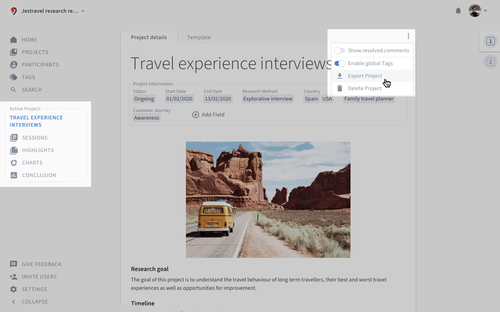
To export all data of a project click on the project name in the menu in the navigation bar on the left side, click on on the top right and then choose Export Project.

The export includes:

  • Text and files from the project description

  • Sessions including notes, transcripts and files

  • A CSV file with the Session information

  • A CSV file with all highlights and their tags

  • A CSV file with the project's taxonomy

  • The Artifacts as a text document and all files from the Artifacts

Who can export Projects

Admins can export any Project. Contributors can export the Projects they have access to, once an Admin turns this on. It's off by default.

To turn it on, go to Settings and General, and switch on Contributors can export Projects.

Learn more about all user roles.


Didn't find what you're looking for? Send us a message and we'll get back to you.