
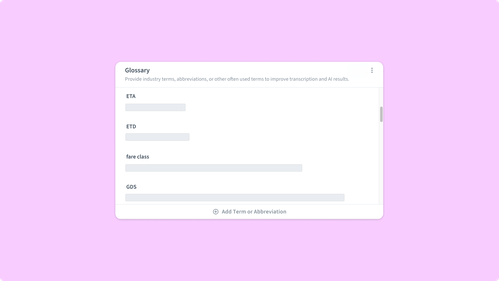
Add Your Team's Vocabulary to Condens with the Glossary
Research teams have their own vocabulary: product and feature names, internal abbreviations, the brands and competitors you study. Most of these are words automatic transcription has no reference for, so it does the best it can and lands on something close.
That's where the small, repetitive corrections come from. You fix the same product name in every transcript, respell an acronym across a study, and after a while it becomes part of the post-interview routine. The Condens Glossary lets you add custom terms to your workspace so transcription recognizes the words specific to your research, like brand names, abbreviations, technical jargon, and product names.
Keep reading to learn more!
From repetitive fixes to a workspace that knows your terms
A single misspelled term takes a second to correct. They add up not because any one is hard, but because they happen often and across the team.
We know this one first-hand. "Condens" is a small, clean word that often comes through as "condense," "condents," "condence," and, on a memorable occasion, "continence." Every fix is trivial, but every session where our name comes up is a session where someone has to make it. The same happens with the names that come up most often in your research.
There's a second effect worth naming. When the same term shows up several different ways across a study, keyword search later won't find all the mentions. The repository still works, but some of the evidence sits behind a spelling you'd never think to search for. Tags and highlights built on those transcripts carry the same inconsistency forward.
The Glossary handles this at the source. You add the terms that matter to your work once, and transcription recognizes them from then on, for everyone in the workspace.
Set your vocabulary once, for the whole workspace
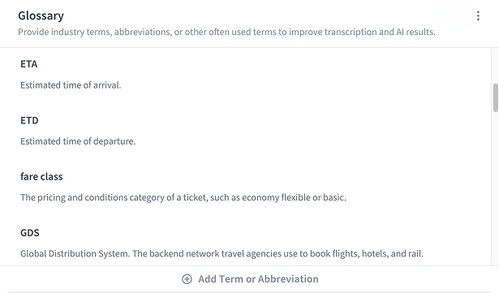
You build your Glossary in your General Workspace settings. Add any term that isn't common knowledge, like:
The brands you research
Your own product and feature names
Industry jargon
Internal abbreviations
The names of competitors you track.
You can add terms one at a time, or import a full list at once via CSV with two columns, the term and its definition. From then on, transcription across the workspace recognizes those terms, in every project and for every researcher.
Because the glossary is set at the workspace level, it isn't a personal preference living on one person's screen. Everyone in the workspace draws on the same set of terms.
Consistency that makes your repository more usable
When every mention of a product, brand, or feature is spelled the same way, the tags and highlights built on top of those transcripts inherit the same consistency. The vocabulary stays steady as your research moves forward and other people start working with it.
It also lowers the cost of reading each other's work. A teammate opening a transcript from a study they weren't part of doesn't pause on what looks like a typo, and a PM or a designer you're sharing the transcript with focuses on what participants said instead of the spelling of the product name.
Search benefits too, though the size of the benefit depends on how you're searching. AI search works on semantic meaning and can still surface mentions across some misspellings. Keyword search is more literal: a query for the correctly-spelled term won't return the sessions where the transcript drifted. Either way, the glossary takes both out of the equation by getting the spelling right from the start.
For distributed and multilingual teams
The bigger your team, the more this value compounds. A vocabulary that lives at the workspace level means every researcher works from the same source of truth, whether they're in the same office or spread across time zones. New work inherits the standard automatically, with nothing for each person to set up.
It helps when research crosses languages, too. A team running studies in several markets is often asking about the same products and feature names, terms that stay constant no matter the language of the interview. Keeping those in the glossary keeps the core vocabulary consistent across markets.
And because the glossary can be exported and imported, a vocabulary built up in one workspace doesn't have to be rebuilt from scratch in another.
How a custom glossary fits into real research
Researchers in a jargon-heavy field
You run interviews in healthcare, finance, or insurance, fields full of regulatory terms, product codes, and acronyms that mean something specific to your participants and nothing to a general transcription model. You add them to the glossary once, and the corrections stop being part of the post-session routine.
Teams that tracks brands and competitors
Your sessions are full of brand and product names that sound like everyday words, and competitor names that get spelled three different ways across a single study. With those names in the glossary, every transcript spells them the same way, which makes it easier to spot patterns across sessions or share clean transcripts with the rest of the company.
Growing research teams
You start your first week and run a few sessions before anyone has time to walk you through the team's vocabulary. The glossary is already set at the workspace level, so your transcripts arrive recognizing the product names, internal acronyms, and brands your team studies. You spend your first reviews thinking about the research, not about what's a typo and what's a real term.
Team doing research in multiple markets
You run usability tests in Germany, the US, and Japan, but you're always asking about the same products with the same names. The glossary keeps that core vocabulary steady in every transcript, so when you compare findings across regions, you're not also reconciling three spellings of your own product.
ReOps leads standardizing the repository
You're the person other researchers come to when something in the repository looks off. The glossary moves a chunk of that maintenance upstream: instead of cleaning up inconsistent product names after the fact, you set them once and every new session inherits the standard.
Getting started
Add your first terms in your General Workspace settings, and your transcripts start speaking your team's language across every session and every project. See the Help Center for how to set up and import your glossary, or reach us at hello@condens.io.

Iva is the Senior Product Marketing Manager at Condens, where she focuses on positioning, messaging, and G2M. With eight years in B2B SaaS, she's developed a real appreciation for the messy, ambiguous early stages of building where there's no playbook yet and the work gets to shape itself. She's passionate about grounding marketing in real customer insight and translating that into work that resonates with the people it's meant to reach.
